Prioritizing Architecture over Coding to build future-ready digital ecosystems. Read Our Philosophy →

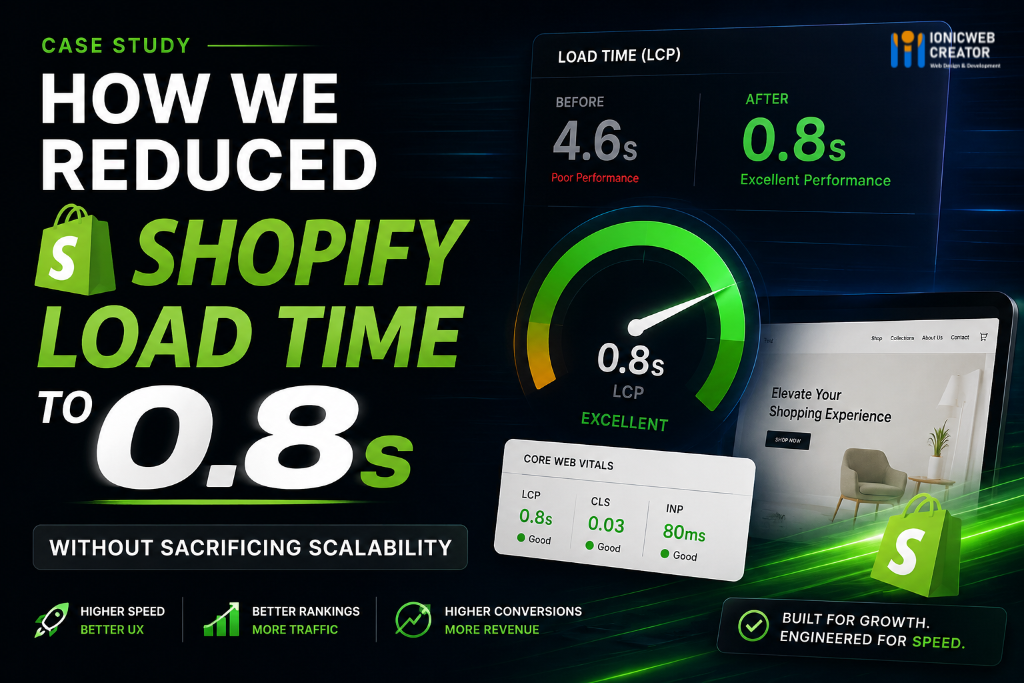
How We Reduced Shopify Load Time to 0.8 Seconds — Without Sacrificing Scalability
Most Shopify stores don’t fail because of bad products.
They fail because the technical foundation cannot keep up with growth.
Over the last few years, we’ve audited and rebuilt multiple ecommerce systems where the same problems kept appearing:
- slow storefront rendering
- bloated third-party apps
- unstable Core Web Vitals
- oversized JavaScript bundles
- poor mobile performance
- delayed API responses
- unoptimized Shopify themes
One particular project came to us with a serious performance issue.
The store looked visually impressive, but the real-world experience told a different story.
Mobile users were waiting 4–6 seconds for pages to become interactive. Bounce rates were increasing, conversion rates were declining, and paid acquisition costs were getting harder to justify.
The goal wasn’t just “make it faster.”
The goal was to engineer a scalable Shopify architecture capable of handling long-term growth without technical debt.
After a complete performance restructuring, we reduced the storefront load time to approximately 0.8s LCP while improving stability, scalability, and overall user experience.
Here’s how we approached it.
The Problem With Most Shopify Stores
Many ecommerce brands unknowingly build performance bottlenecks into their stores over time.
As marketing campaigns expand and features get added, the storefront slowly accumulates:
- unnecessary apps
- blocking scripts
- duplicated libraries
- render-heavy sections
- unoptimized media assets
- synchronous third-party requests
Eventually, the store becomes dependent on layers of patches instead of a structured architecture.
In this case, the store had:
- excessive JavaScript execution
- render-blocking assets
- heavy third-party tracking scripts
- multiple app conflicts
- oversized image payloads
- inefficient Liquid rendering logic
The storefront technically “worked,” but performance was degrading with every update.
Why Performance Matters More Than Most Businesses Realize
Speed is no longer just a UX metric.
It directly affects:
- conversion rates
- ad performance
- SEO visibility
- mobile retention
- customer trust
- checkout completion
Even small delays can create measurable revenue loss.
For ecommerce brands running paid acquisition campaigns, slow storefront performance also increases effective customer acquisition costs because users abandon before engaging with the buying journey.
A high-performing storefront improves both user experience and marketing efficiency simultaneously.
Step 1 — Auditing the Entire Frontend Architecture
Before changing anything, we performed a full technical audit.
We analyzed:
- Core Web Vitals
- JavaScript execution time
- network waterfalls
- render-blocking resources
- Shopify theme architecture
- third-party integrations
- app dependencies
- Liquid rendering patterns
The issue wasn’t caused by one single bottleneck.
It was architectural accumulation.
This is common in scaling ecommerce systems.
Step 2 — Removing Unnecessary App Overhead
One of the biggest hidden performance killers in Shopify ecosystems is excessive app dependency.
Many apps inject:
- external scripts
- duplicate CSS frameworks
- background requests
- event listeners
- client-side rendering overhead
The store had multiple overlapping apps solving similar problems.
We consolidated functionality wherever possible and removed non-essential scripts entirely.
This immediately reduced JavaScript execution time and network requests.
Step 3 — Rebuilding Critical Theme Components
Instead of relying on generic theme-level logic, we rebuilt several high-impact sections using lightweight custom architecture.
This included:
- optimized Liquid rendering
- conditional asset loading
- modular component structure
- reduced DOM complexity
- deferred non-critical scripts
The focus was not only speed — but maintainability.
A fast store that becomes difficult to scale later is still technical debt.
Step 4 — Optimizing Core Web Vitals
Core Web Vitals optimization was approached systematically.
We improved:
Largest Contentful Paint (LCP)
By:
- prioritizing above-the-fold assets
- optimizing hero rendering
- reducing blocking resources
- improving server response timing
Cumulative Layout Shift (CLS)
By:
- stabilizing layout containers
- defining media dimensions properly
- restructuring async content rendering
Interaction to Next Paint (INP)
By:
- minimizing heavy JavaScript execution
- reducing long tasks
- improving frontend responsiveness
The result was a significantly smoother mobile experience.
Step 5 — Image & Media Optimization
Large unoptimized assets were another major bottleneck.
We implemented:
- next-gen image optimization
- responsive image delivery
- lazy loading strategies
- optimized compression pipelines
- conditional media rendering
This reduced unnecessary payload delivery across mobile devices and slower connections.
Step 6 — Engineering for Scalability, Not Just Speed
Many agencies optimize for Lighthouse scores only.
That approach rarely survives real-world growth.
Our focus was broader:
- scalability
- maintainability
- reliability
- long-term performance stability
The storefront architecture was rebuilt to support:
- future integrations
- higher traffic loads
- evolving ecommerce operations
- feature expansion without performance collapse
This is the difference between surface-level optimization and engineering-led ecommerce architecture.
The Final Result
After deployment and stabilization:
- LCP reduced to approximately 0.8s
- significantly lower JavaScript execution time
- improved mobile responsiveness
- cleaner frontend architecture
- improved Core Web Vitals stability
- stronger performance consistency across devices
More importantly, the storefront became operationally healthier.
The business could now scale campaigns, features, and traffic without the previous technical bottlenecks.
Performance Optimization Is Not About Chasing Scores
A fast ecommerce store is not created through plugins alone.
Real performance engineering requires understanding:
- rendering behavior
- frontend architecture
- asset strategy
- Shopify internals
- scalability patterns
- user interaction performance
The goal should never be “green Lighthouse numbers.”
The goal should be building ecommerce infrastructure that remains performant as the business grows.
Final Thoughts
As ecommerce systems scale, technical debt compounds quietly.
What starts as “just one more app” or “just one more feature” eventually impacts conversion rates, acquisition efficiency, and customer experience.
Performance optimization is no longer optional for growth-focused ecommerce brands.
It’s infrastructure.
At IONICWEB CREATOR, we approach Shopify engineering from a systems perspective — combining performance architecture, scalability engineering, and long-term maintainability to build storefronts designed for sustained growth.
If your storefront performance is limiting growth, the issue is often deeper than theme optimization alone.
Need help optimizing your Shopify storefront for speed and scalability?
At IONICWEB CREATOR, we engineer high-performance ecommerce systems focused on Core Web Vitals, scalability, and long-term growth.
Request a strategic consultation to audit your storefront architecture and performance bottlenecks.
💬 Discussion (1)
1 Comments
Log in to comment